
How to Setup a Health Dashboard on Your iPhone. Your Command Center for the Marginal Decade
Setting up this dashboard is the single most important "digital biohack" you can perform. It moves you away from being a passive recipient of medical advice and into the role of the Chief Health Officer of your own life.
Evergold Longevity
2/6/20263 min read
In the Evergold philosophy, we believe that you cannot manage what you do not measure. For many seniors, the iPhone is seen primarily as a tool for FaceTime with grandkids or checking the weather. But beneath that glass screen lies the most sophisticated health-tracking computer ever made available to the public.
When properly configured, the Apple Health App acts as your personal "Health Command Center." It is the central nervous system where your heart rate data, sleep cycles, walking stability, and even lab results from your doctor converge.
Setting up this dashboard is the single most important "digital biohack" you can perform. It moves you away from being a passive recipient of medical advice and into the role of the Chief Health Officer of your own life. Here is how to build your Evergold Dashboard.
1. The Foundation: Understanding the Health App
The Health App (represented by the white icon with the red heart) is not just a place where steps are counted. It is a secure database designed to aggregate data from three sources:
iPhone Sensors: Tracking your movement and walking steadiness.
Wearables: Data from your Apple Watch, Oura Ring, or Blood Pressure cuff.
Manual Entry & Health Records: Lab results and medical history synced directly from your healthcare provider.
2. Safety First: The Medical ID
Before we track your $VO_2$ Max, we must ensure your safety. The Medical ID is a feature that allows first responders to access your critical health information from your lock screen without needing your passcode.
How to Setup:
Open the Health App.
Tap your Profile Picture in the top right.
Tap Medical ID.
Enter your birth date, medical conditions, allergies, and medications.
The Evergold Essential: Add your "Emergency Contacts." If your iPhone or Apple Watch detects a hard fall, these are the people who will be notified automatically with your GPS location.
3. Customizing Your "Summary" Tab (The Favorites)
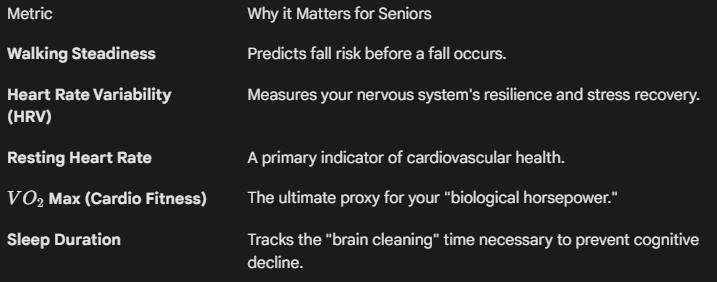
The "Summary" tab is the first thing you see when you open the app. By default, it’s cluttered. For a senior biohacker, we want to pin the "Vital Signs of Longevity" to the top.
Metrics to "Favorite":
To add these, tap Edit next to the "Favorites" header and tap the star next to:
4. The "Early Warning" System: Setting Up Health Notifications
One of the most powerful features of the iPhone dashboard is its ability to "watch" you while you aren't looking. You should enable Health Notifications to act as an early warning system.
High/Low Heart Rate: Set your watch to alert you if your heart rate goes above 120 or below 45 while you appear to be inactive.
Irregular Rhythm: Enable this to allow your watch to check for signs of Atrial Fibrillation (AFib).
Walking Steadiness Notifications: If your gait changes—perhaps due to a new medication or undiagnosed joint issue—the iPhone will alert you that your fall risk has increased.
5. Connecting Your "Gold Nuggets" (Third-Party Integration)
Your dashboard becomes truly "Limitless" when you connect your other biohacking tools.
Smart Scales: If you use a scale like the Hume Body Pod, ensure it is synced. This will automatically update your "Body Fat Percentage" and "Visceral Fat" in the Health App.
Nutrition Apps: Apps like Cronometer can sync your protein intake to the dashboard. As we know, maintaining protein intake is vital for fighting Sarcopenia.
CGMs: If you are tracking Glucose 105, your monitor (Dexcom/Libre) should be set to "Write" data to the Health App.
Evergold Tip: To manage these connections, tap your Profile Picture > Apps > Select the app > Turn On All.
6. Reading the Trends, Not the Moments
A single bad night of sleep or a high glucose reading is a data point. A Trend is a message.
Scroll down to the "Trends" section in your Summary tab. The iPhone uses algorithms to tell you if your activity is decreasing or if your resting heart rate is trending upward over the last 6 weeks.
If a trend is "Down": Ask yourself what changed. A new medication? Less sunlight?
If a trend is "Up": Celebrate the win! This is the positive feedback loop that keeps biohacking sustainable.
7. Privacy: Who Sees Your Data?
A common concern for the 60+ generation is privacy. Apple encrypts Health App data end-to-end. If you have Two-Factor Authentication enabled, even Apple cannot read your health data.
However, you should choose to share this data with your doctor or a trusted family member.
Tap the Sharing tab at the bottom.
Tap Share with someone.
Choose your spouse or adult child. You can select exactly which metrics they see (e.g., "Only alerts for heart rate and falls").
Conclusion: Your Health is Now in Your Hands
Setting up your iPhone Health Dashboard is a declaration of independence. It transforms a piece of consumer electronics into a sophisticated medical monitor that works for you 24 hours a day.
By pinning your "Favorites," enabling life-saving notifications, and monitoring your trends, you are no longer guessing about your health. You are navigating your Marginal Decade with a high-definition map.
Contact
© 2026. All rights reserved.
DISCLAIMER
We love sharing information, but please remember we aren't doctors, lawyers, or financial advisors. Always check in with a professional before you start a new fitness routine, change your diet, or make big financial decisions. Your specific situation deserves expert attention.